Help / Your library
Library Health & finding duplicates
Library Health scans your whole collection for the small problems that build up over the years - missing tags, absent cover art, duplicate copies, damaged files - and gives you tidy, one-tap ways to fix them.
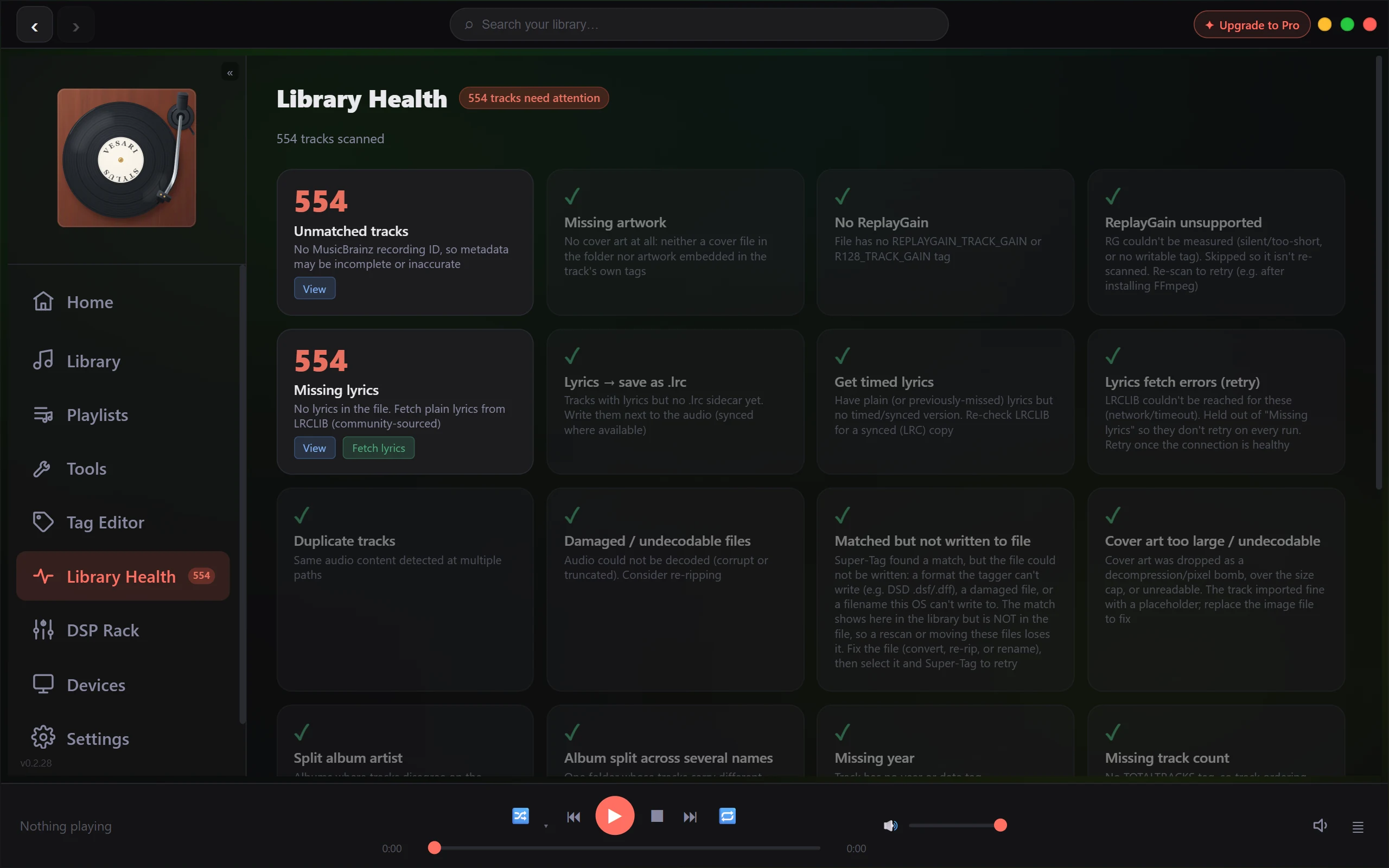
What Library Health does
Open Library Health and it walks every track in your library, sorting what it finds into plain categories. Each one shows a count and a short description of the issue:
- Unmatched or incomplete tags - tracks with no confirmed match, so titles, artists or album info may be missing or wrong.
- Missing artwork - albums with no cover found.
- Missing lyrics, loudness data, year or track numbers - small metadata gaps you can fill in a batch.
- Duplicate tracks - the same recording sitting in more than one place (more on this below).
- Damaged or undecodable files - audio that won't play, usually corrupt or truncated, and worth re-ripping.
A clean category shows a tick. The header keeps a running total, so you can watch it drop as you work through the list.
Scanning and flagging is always free
Running the scan and seeing every flagged issue costs nothing - it's part of the app for everyone. You can browse the affected tracks in any category and understand exactly what's going on before you decide to change a thing.
Finding and reviewing duplicates
When more than one file holds the same recording, Library Health groups those copies together and suggests a keeper for you.
- Open the duplicate review from the duplicates category.
- Each group shows the copies side by side, with format, bit depth, sample rate and file size.
- The highest-quality copy is marked to keep automatically; the others are marked to move aside.
- Change the selection if you'd rather keep a different copy, then apply (Pro, Lifetime, or during the trial).
Your play counts and listening history follow the copy that's kept, so none of your stats are lost.
Fixing is reversible, never a straight delete
When you apply a cleanup, the extra copies aren't deleted - they're moved to a quarantine area inside your library, like a recycle bin. You can restore a batch to its original place from the Quarantine tab of the duplicate review for as long as its files are still there. That tab opens from a Review duplicates button, which is not always shown: I moved duplicates to quarantine and cannot find the files says when, and how to move files back by hand. The app only removes quarantined copies for good when you Purge their batch, and it asks you to confirm first. Quarantine: how removed copies are kept, restored and purged has the detail.
The one-tap duplicate cleanup is a premium feature
Scanning and flagging every issue is free for everyone, and so is repairing malformed WAV containers, singly or across the whole library. The one-tap action that clears out duplicates across the whole library at once - moving copies to quarantine in a batch - is a premium feature. On Free there's no bulk-fix allowance; a trial can move up to 250 copies in total, and Pro and Lifetime are uncapped. Everything you see flagged stays visible either way; the upgrade simply lets you act on it all in one go rather than track by track. What the free allowance covers explains how the allowances are counted.